Find the right wall-mounted projector shelf to keep consoles, routers, modems, and projectors organized without sacrificing style. This guide focuses on space-saving, sturdy shelves designed to mount on walls and hold common home theater gear. The top picks target different buyer needs—from simple single-shelf solutions for smaller rooms to two-tier options that maximize storage while keeping wires neat. Ideal buyers include small-apartment dwellers, AV enthusiasts seeking cleaner setups, and homeowners looking to declutter entertainment centers.
Summary table of selected products:
- CS201N: 1-shelf wall-mount wooden option with cable holes on both sides (up to 22 lbs).
- CS202N: 2-shelf wooden wall-mount option with cable management (up to 22 lbs total per shelf).
- AREAJD Wall Mount Shelf: Small mini projector shelf with easy wall mounting (up to 10 lbs).
- BEARUT Projector Shelf: Large 16.2″ x 11″ shelf for projector, router, and modem.
- SARUFO Acacia Wood Shelf: Acacia wood floating shelf for projector, router, or gaming gear.
WALI CS201N: 1-Shelf Walnut Floating Projector Shelf

Best for compact AV setups in small living rooms or bedrooms, where only one shelf is needed to hide a DVD player, router, or streaming box. This wooden shelf measures 13.78 x 11.02 inches and can hold up to 22 lbs. Its dual wire holes support organized cable routing from both sides, reducing visible clutter. Choose this if you want a simple, low-profile solution without multiple levels.
Best use case: single-device containment with clean cable management. Limitation: not ideal for longer, heavier equipment beyond 22 lbs total per shelf.
WALI CS202N: 2-Tier Walnut Floating Shelf
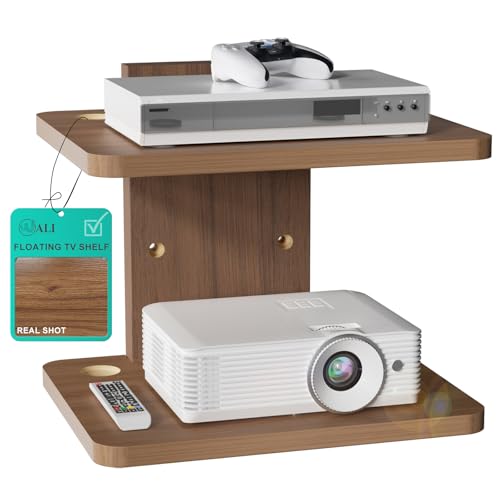
This two-tier option is best for users who need to accommodate multiple devices like a modem, router, and gaming console in one clean wall-mounted system. Each shelf supports up to 22 lbs, with built-in cable management holes on both sides to minimize end wires. It’s an ideal upgrade for larger setups where space conservation and aesthetics matter. Consider this if you want a layered look without sacrificing access to outlets.
Limitation: heavier loads may require careful distribution; note the product notes advise it can work on drywall with proper mounting, but avoid overloading.
AREAJD Black White Mini Projector Shelf

Best for ultra-compact rooms or decorative setups, this small wall-mounted shelf is designed for projectors up to about 11.7 by 7.87 inches and loads up to 10 lbs. It helps keep a projector off furniture and reduces cable clutter. Choose this option if you prioritize minimal footprint and quick, tool-light installation. Limitation: size restricts larger projectors or heavier AV gear.
BEARUT Projector Shelf: Large Wall Mount Rack

Best for bigger rooms or setups needing extra surface area, this shelf measures 16.2″ x 11″ and is suitable for a projector, router, or modem with room to spare for a power strip and cables. It’s designed as a combined projector and router shelf, helping to tidy up a cluttered entertainment area. Limitation: listed max usage describes internal space rather than explicit weight per shelf; ensure devices fit within the given dimensions.
SARUFO Acacia Wood Projector Shelf

Best for style-conscious buyers who want natural wood grain and a sturdy mount. This acacia wood floating shelf is 0.8 inches thick and includes all mounting hardware with a template for quick installation. It doubles as an all-in-one organizer for a projector, router, modem, or gaming console, helping declutter various rooms. Limitation: wood color and grain vary by piece, which may affect uniformity in a multi-shelf setup.
Ztounk Projector Wall Mount Shelf

Best for space-saving in medium-size rooms, this 11.81″ x 7.87″ shelf provides robust support for a projector, router, modem, and gaming devices. Its hollow-out design boosts airflow to prevent overheating. It’s a solid choice if you want a balanced mix of device clearance, heat management, and a simple mounting process. Limitation: weight and dimensions should be checked against your devices to ensure compatibility.
BAISHUN Projector Stand: Wall And Ceiling Mount

Best for versatile mounting options, this BAISHUN stand offers 360-degree rotation and tilt with a 1/4-inch screw thread, suitable for various projectors. It supports up to 4.4 lbs and can be mounted on walls or ceilings, making it a flexible choice for angled or multi-room setups. Limitation: lighter max load means it’s not suitable for heavier AV gear or larger projectors.
Buying Guide: Key Purchase Considerations
- Size and fit: Measure your projector, router, and other devices. Choose shelves that accommodate length, width, and height, plus ensure clearance for plugs and cords.
- Weight capacity: Confirm per-shelf weight limits and total load for multi-shelf units. Heavier equipment may require thicker materials or multiple mounting points.
- Material and finish: Wood shelves provide warmth and sturdiness; glass shelves offer a modern look but may require careful handling of heavier items; consider room style and wall type for drywall or concrete.
- Cable management: Look for shelves with wire holes or built-in cable channels to keep cords organized and hidden from view.
- Installation ease: Some shelves include templates and necessary mounting hardware; others may require additional tools or expertise for wall or ceiling mounting.
- Ventilation: Shelves with open designs or hollow spaces help maintain airflow around electronics to minimize overheating.
- Wall compatibility: Drywall mounting requires appropriate anchors and screws; check weight distribution and consult a professional if uncertain.
Frequently Asked Questions
- What should I consider before buying a wall-mount projector shelf? – Consider device size, weight capacity, wall type, ventilation, and whether you need one or two shelves for your setup.
- Are these shelves suitable for ceiling mounting? – Some models offer ceiling mounting or flexible mounting options; always verify mounting compatibility in the product details.
- Can I mount a projector and router on the same shelf? – Yes, if the shelf provides enough space and weight capacity; ensure proper ventilation for the projector and ease of access to outlets.
- Do these shelves affect room aesthetics? – Many shelves are designed to blend with furniture, offering wooden, glass, or coated finishes to match decor.
- How do I manage cables effectively with these shelves? – Choose shelves with built-in cable holes or channels to guide wires neatly to power outlets and AV receivers.
- What if I have heavy equipment or multiple devices? – A two-tier shelf or a higher-weight rated unit is preferred; distribute weight evenly and follow mounting instructions carefully.