Facing a choice among digital sliding door locks? This guide highlights five top options that balance security, convenience, and installation versatility. Each pick is suited for different user needs—from remote app control and biometrics to mechanical keypad reliability. Whether you own a patio, balcony, or sliding glass door, these picks help you choose the best fit for your home security and everyday convenience.
Summary Table
| Product | Best For | Key Features |
|---|---|---|
| JNZCH Sliding Door Smart Lock | Fingerprint, IC card, PIN, Tuya app, remote unlock, auto relock | |
| eLinkSmart Slim Keypad Door Lock | 5-in-1 unlock, built-in WiFi, door thickness range, multiple adapters | |
| Pothunder Sliding Door Lock | Fingerprint, Passcode, WiFi App, RFID, Key, one-time codes | |
| eLinkSmart Slim 2885 Lock | 5-in-1 unlock, built-in WiFi, wide thickness compatibility | |
| Anweller Mortise Sliding Door Locks | Fingerprint, Passcode, App, RFID, tamper protection |
JNZCH Sliding Door Smart Lock With App Control
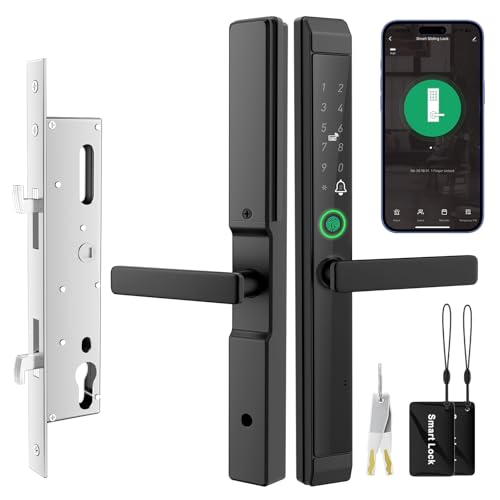
Best for homeowners seeking comprehensive digital access with multiple unlock methods. The JNZCH lock uses a built-in security chip to deter hacking and supports 2.4 GHz Wi‑Fi setup via the TUYA app. Unlock options include fingerprint, IC card, PIN code, the TUYA app, or a physical key, with automatic relock after use. This makes it ideal for households that want convenience without compromising security, such as families with kids or frequent guests.
- Best for: users who want finger biometric access plus remote control.
- Why selected: broad unlock options and remote control capabilities improve daily usability and security.
- Caution: Ensure your router broadcasts on the 2.4 GHz band for app setup.
eLinkSmart Slim Keypad Door Lock With Built-In WiFi

Better for users who want strong multi-access without hub dependencies. This lock integrates built-in WiFi for direct Tuya app control, allowing remote entry, one-time codes, and guest scheduling. It supports fingerprint, password, NFC card, app remote, and a key, making it versatile for homes with frequent visitors or service personnel. It also includes a broad door-thickness range and a sturdy hook latch.
- Best for: people who want no extra hub and direct app access from anywhere.
- Why selected: 5-in-1 unlock plus remote control expands access management beyond the home.
- Caution: Confirm the door thickness compatibility with your current frame before install.
Pothunder Sliding Door Lock With App And Keys

Best for households that need robust, multi-method access and detailed activity tracking. The Pothunder lock offers fingerprint, code, app, RFID Card, and a spare key, plus time-limited one-time codes. The system supports up to 300 users and provides unlock history, which helps monitor who enters and when. The 0.2-second fingerprint recognition adds speed for daily use, while app-based tamper alerts enhance security.
- Best for: large households or vacation rentals needing multiple user accounts.
- Why selected: strong access control options plus real-time monitoring.
- Caution: Ensure WiFi stability to maintain reliable remote unlocks.
EIMSOAH Keyless Sliding Door Lock With Mechanical Backup

Best for simple, passive security where power supply is a concern. The EIMSOAH mechanical keypad lock provides 1 to 11 non-repeating code combinations and does not require a power source, making it resilient in outages. It uses a zinc alloy shell for durability and chrome plating for corrosion resistance. It is suitable for kitchens, offices, and balconies where a keypad-based, non-electrical solution is preferred.
- Best for: off-grid or power-sensitive installations requiring keyless entry without electronics.
- Why selected: reliable mechanical keypad operation with adjustable password length.
- Caution: Lacks biometric or remote app features; less flexible for frequent guests.
Anweller 2885 Mortise Sliding Glass Door Lock
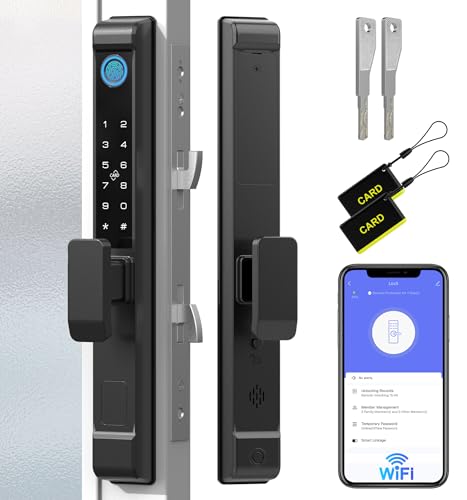
Best for high-security needs with flexible access methods. The Anweller 2885 Mortise Lock supports fingerprint, code, RFID, mobile app remote access, and a spare key. It is designed for thicker doors and offers multiple protections, including a 90-second lockout after multiple invalid attempts and a tamper alarm. This makes it suitable for homes or offices requiring robust intrusion prevention and flexible user management.
- Best for: security-conscious users needing multi-method authentication and tamper alerts.
- Why selected: strong protection features and broad access options for varied door setups.
- Caution: Verify door thickness compatibility and frame width before purchasing.
Buying Guide: Key Considerations for Digital Sliding Door Locks
- Access methods: Choose a lock that supports your preferred combination of fingerprints, codes, cards, apps, and keys. Consider whether you need remote unlock and temporary access for guests or service personnel.
- Connectivity: Determine if you want built-in WiFi or need a hub-free solution with app control. Verify compatibility with Tuya or other ecosystems you already use.
- Door compatibility: Check door thickness and frame dimensions. Some locks provide multiple adapters or adjustable latching systems to fit varying thicknesses.
- Security features: Look for anti-peep codes, tamper alerts, auto relock, and history logs. Higher security models offer more robust protection against tampering and unauthorized access.
- Power considerations: If selecting a battery-powered lock, budget for battery life and easy replacement. Mechanical backups are useful in power outages.
- Installation: Assess whether installation requires professional help or if it’s a DIY job. Reversible handles and left/right compatibility simplify mounting on different door orientations.
- User management: For homes with many users, prioritize locks that support multiple credentials, time-limited codes, and audit trails.
Frequently Asked Questions
- What is the difference between a smart lock and a mechanical keypad lock for sliding doors?
Answer: Smart locks offer digital access, remote control, and activity logs, while mechanical keypad locks rely purely on codes without connectivity or app features. - Do these locks require a hub to work?
Answer: Some models have built-in WiFi and no hub, while others may require a hub or rely on Tuya compatibility for remote features. - Can I use fingerprints for multiple users?
Answer: Many models support multiple fingerprints and user codes, with permissions and logs accessible via the app. - What should I verify before buying for a sliding glass door?
Answer: Confirm door thickness range, frame width, and whether the latch supports your door orientation (left or right sliding). - Is a mechanical backup important?
Answer: Yes, mechanical backups ensure access during power outages or WiFi downtime, depending on the model. - Are these locks weather-resistant?
Answer: Many are designed for outdoor or patio use, but verify IP rating or weatherproofing specifics with the product page.