Find the right floating shelf solution to hide wires and keep your router, modem, and AV gear neatly organized. This guide highlights five practical options, each chosen for ease of installation, cable management features, and suitability for different living spaces. The best pick depends on your space, how many devices you need to tuck away, and whether you prefer a box-style cover or open shelving for airflow and access.
| Product | |||
|---|---|---|---|
| Wooden WiFi Router Storage Box – Dark Oak (Gadget Garage) | Router Storage Box | Small living rooms; stylish concealment | Cable management straps and finished wood to blend with decor |
| TuckTect Floating Solid Wood Console Table (Walnut) | Floating Console Table | Hallways and entryways; slim, open-drawer look | Durable solid wood with versatile storage and safety edge |
| BEARUT Router Shelf Wall Mount (SSE) | Large Cable Management Box | Risers for multiple devices; clean desk-to-wall switch | Large internal space for router, power strip; multiple routing holes |
| IBUYKE Floating TV Stand Wall Mounted with Power Outlet | Wall-mounted Media Console | Living rooms with multiple devices | Built-in power outlets; cable management and storage cubes |
| NIUBEST Small Floating Shelf (White) | Small Wall Shelf | Compact setups; easy wire access hole design | Sturdy solid-wood construction with cord holes |
Wooden WiFi Router Storage Box – Dark Oak
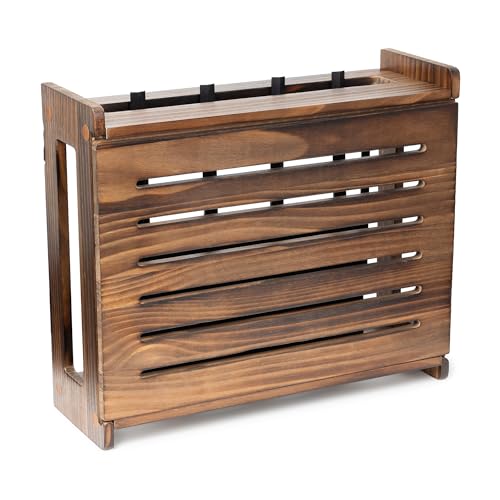
Best for: Small spaces where aesthetics matter as much as function. This pine wood router cover hides a router or modem while providing clean cable organization with hook-and-loop fasteners. It’s ideal when you want a discreet storage solution that blends with natural wood tones rather than a metal or open-shelf look.
Why chosen: The unit emphasizes a refined finish and five wood options, allowing you to match decor. It comes with matching screw covers and dedicated cable management to reduce visible clutter. The included fasteners help organize the “rats’ nest” of wires, improving accessibility when you need to service devices.
Caution: It may not fit larger routers or power strips; check the internal dimensions before purchasing. The design prioritizes concealment and access rather than visible display.
TuckTect Floating Solid Wood Console Table

Best for: Narrow entryways or living areas where you want a slim table that doubles as a storage shelf. The floating design saves floor space and the built-in storage area helps conceal cables and small devices alongside decor items.
Why chosen: Solid wood construction and a protective finish offer durability, while a safety-conscious edge design helps prevent injuries in high-traffic areas. The table’s versatility makes it a practical anchor for plant stands, lamps, or a small router in a single, tidy footprint.
Caution: This model is optimized for entryways and narrow walls; heavier media components should be assessed for load capacity before mounting near a TV or equipment cluster.
BEARUT Router Shelf Wall Mount SSE
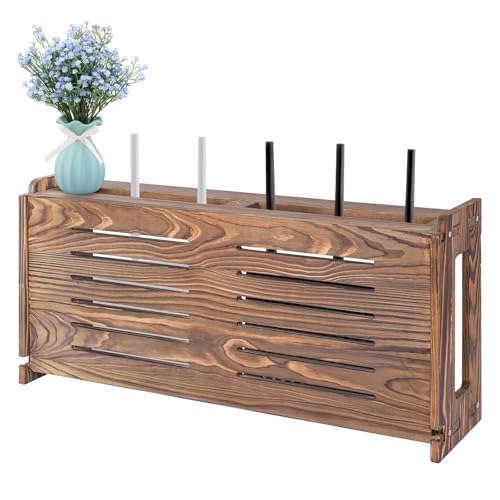
Best for: Users seeking a large internal space to house a router, modem, and power strip while keeping everything organized in one box. This option is well-suited to living spaces with multiple devices that benefit from a central, cable-managed hub.
Why chosen: The large internal space supports multiple devices, and the hollow routing holes plus a recessed power strip make cable management straightforward. It’s a practical choice when you need to consolidate devices behind a single enclosure.
Caution: The size may dominate smaller walls; verify wall space and depth to ensure a proper fit before installation.
IBUYKE Floating TV Stand Wall Mounted with Power Outlet

Best for: Media-rich living rooms or bedrooms where a floating shelf needs to accommodate a TV, gaming console, router, and other peripherals. The built-in power outlets simplify charging and reduce the number of visible cords.
Why chosen: The unit integrates a recessed power strip and four standard outlets, making it a practical hub for entertainment systems. The open front cubes provide accessible storage for remotes and small accessories while keeping wires tucked away.
Caution: The overall depth should be checked to ensure adequate clearance behind mounted TVs or large soundbars, and installation may require anchoring to studs for heavy components.
NIUBEST Small Floating Shelf for Wall

Best for: Compact setups that require a discreet cord hole for quick and easy wire access. Great for cameras, webcams, routers, or smart speakers in tighter spaces.
Why chosen: The 9-inch width and solid wood construction deliver sturdy support with clean lines. The built-in cord hole design helps route cables neatly, reducing visual clutter without sacrificing accessibility.
Caution: Weight limits are modest; avoid loading the shelf with heavy devices. Ensure adequate wall attachment hardware for safe mounting, especially on plaster or drywall alone.
Buying Guide: Key Considerations For Choosing The Right Floating Shelf Or Box
- Size and load capacity: Measure the space where you plan to mount and check the weight limits for routers, modems, and power strips. Choose a shelf or box that can safely support all devices without sagging.
- Cable management features: Look for built-in holes, channels, hook-and-loop fasteners, or recessed power strips. Clear separation of power and data cables reduces interference and simplifies servicing.
- Ventilation: Ensure there is adequate airflow around electronic devices. Boxes with solid panels may limit heat dissipation; consider perforated sides or open designs if heat is a concern.
- Style and decor: Wood tones and finishes should complement your room. If concealment is the goal, a box-style cover that blends with furniture can be preferable to open shelves.
- Installation method: Some options offer no-drill adhesive mounts, while others require mounting to studs. Decide based on wall type (drywall, plaster, brick) and whether you plan to relocate the setup in the future.
- Accessibility: If you need frequent access to cables, choose designs with easy front access or removable panels. A balance between concealment and accessibility helps maintenance.
Frequently Asked Questions
- What is the best solution to hide router cables without blocking airflow?
Look for a shelf or cabinet with ventilated sides or open back panels, and use cable management holes or clips to route cords neatly. - Do these shelves support wall mounting without professional installation?
Many options offer DIY mounting with included hardware, but check wall type and weight limits. Some may require stud anchoring for heavier devices. - Can I place a router in a closed box?
Yes, but ensure there is enough ventilation and avoid overheating by allowing some airflow around the router and modem. - Are these solutions compatible with TVs or other large devices?
Some floats are designed to share wall space with TVs; verify depth and weight capacity to avoid interference with mounts or stands. - Which option provides the best cable management for multiple devices?
Boxes with built-in power strips and multiple cable routing holes are typically best for consolidating several devices in one location. - What if my wall isn’t perfectly flat or studs aren’t aligned?
Use anti-slip or adhesive options where available, but plan for reinforcements or alternative mounting methods if hardware alignment is critical.