Answering your search for a reliable bracket for mounting a TV to the wall, this guide highlights five top options that balance strength, ease of installation, and flexibility. Each pick is suited to different buyer needs—from slim, low-profile mounts to no-stud solutions. Use the quick comparison table below to pick the best fit for your TV size and wall type.
| Product | Best For | Key Benefit |
|---|---|---|
| ECHOGEAR Heavy Duty TV Wall Mount Bracket | Large TVs up to 90″ and cable-access users | Low profile with pull strings for cable access |
| Auoace No Stud TV Wall Mount | Drywall-only installations, quick no-drill setup | No stud damage, simple 3-minute installation |
| Mounting Dream MD2380 | Swivel/tilt full-motion on standard studs | Easy post-install leveling and full motion |
| ECHOGEAR Tilting Low Profile Mount | Glare reduction on mid-to-large TVs | Low profile with up to 10° tilt and center alignment |
| Pipishell Full Motion TV Wall Mount | Smaller to mid-size TVs and computer monitors | Full motion with 360° rotation and 14.59″ reach |
ECHOGEAR Heavy Duty TV Wall Mount Bracket (Up To 90″)

This low-profile mount supports TVs up to 90″ and adds cable access via pull strings behind the TV. It installs in under 20 minutes with a wall template and includes a leveling adjustment of +-5°. Best for large-screen setups where space behind the TV needs easy cable routing and a clean wall appearance. The main limitation is the need for a solid wall surface capable of supporting a large monitor weight, as with any heavy-duty mount.
Auoace No Stud TV Wall Mount

Designed for drywall-only rooms, this no-stud mounting option promises a quick, drill-free installation. It supports TVs from 13″ to 55″ (VESA 100×100 to 400×400) up to 99 lbs, with a detailed English setup guide. Best for renters or rooms where drilling is a concern. A potential limitation is reduced compatibility with very large or non-standard TV sizes beyond the stated range.
Mounting Dream MD2380 Full Motion Wall Mount

This full-motion mount fits 32–65″ TVs (up to 99 lbs) with VESA up to 400×400 mm and is designed for standard 16″ studs. It tilts 5° up and 15° down, extends up to 17.5″ and retracts to 3.4″. Best for flexible seating positions and glare reduction. Choose this if you need substantial reach and easy post-install leveling. Limitation: larger TVs near the 65″ limit may require careful space planning and stud access.
ECHOGEAR Wall Mount TV Bracket (Tilting, Up to 90″)
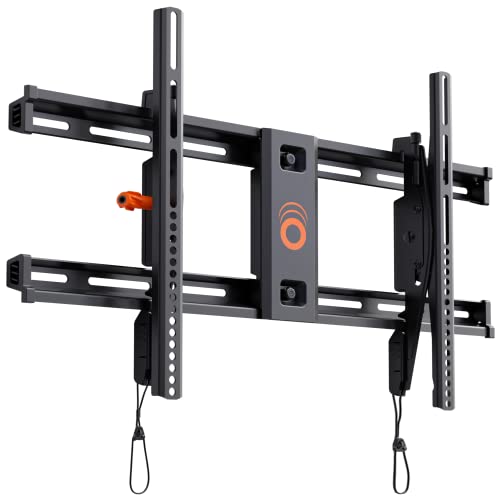
This tilting, low-profile mount supports TVs from 40″ to 82″ and offers a 10° tilt to eliminate glare. It centers between studs and allows leveling after installation. Best for viewers seeking glare reduction with a slimmer wall footprint. Limitation: tilt range is limited to 10°, which may not satisfy all glare scenarios or wall geometry.
Pipishell Full Motion TV Wall Mount

This mount suits 13″–43″ TVs or monitors up to 44 lbs with VESA patterns 75×75 to 200×200 mm. It offers +9°/-11° tilt, up to 90° swivel, and 360° rotation with a 14.59″ extension. Best for smaller rooms or computer-monitor use where wide viewing angles are needed. A limitation is its lighter weight capacity, making it unsuitable for larger TVs.
Buying Guide
What should you consider when choosing a TV wall mount?
- TV size and weight: Match the mount’s weight rating and VESA compatibility to your TV. Larger TVs require stronger, sometimes dual-arm designs.
- Wall type and studs: Determine if your wall can support a fixed, tilting, or full-motion mount. No-stud options are useful in drywall, but may limit weight support and range of motion.
- Motion range: If glare is a concern, prefer tilting or full-motion mounts with sufficient tilt and swivel angles.
- Depth and aesthetics: Low-profile mounts minimize the gap between TV and wall for a cleaner look.
- Installation complexity: Templates, leveling, and pre-labeled hardware simplify mounting, especially for beginners.
- Cable management: Consider mounts with integrated cable access or a path behind the TV for clean routing.
Frequently Asked Questions
- What is VESA compatibility and why does it matter?
VESA refers to the mounting hole pattern on the back of your TV. Matching VESA patterns ensures the mount fits securely. - Can I mount a large TV on drywall alone?
Drywall-only mounts exist, but they require careful weight considerations and proper wall anchors. For heavier TVs, studs are strongly recommended. - Do I need a leveling adjustment after installation?
Many mounts offer post-install leveling to ensure the TV sits straight even if the wall isn’t perfectly flat. - Is a full-motion mount worth it for small rooms?
If you need flexible viewing angles or space-saving rotation, a full-motion mount can be beneficial even in compact spaces. - What’s the difference between tilt and swivel?
Tilt refers to up/down adjustment to reduce glare; swivel rotates left/right for viewing from different seats. - Are any mounts UL listed or certified for safety?
Some models come with safety certifications or UL listing; verify for each product when safety is a priority.