When choosing a bedroom lock with code, prioritize options that balance convenience, security, and simple installation. This guide highlights five top door locks that support fingerprint, keypad, and/or code entry—ideal for bedrooms, home offices, or apartments. Best for busy households, frequent guests, or shared spaces, these models offer quick access, robust authentication, and reliable auto-lock features. The following selections emphasize fast recognition, durable hardware, and flexible entry methods. Use the buying guide to compare features, installation needs, and long-term usability across real-world scenarios.
| Product | Best For | |
|---|---|---|
| Evanshow Fingerprint Door Lock (Black) | Front doors, bedrooms, or offices; households with many members | 4-in-1 access: fingerprint, password, 2 keys, IC cards; admin setup required; USB emergency power |
| Evanshow Fingerprint Door Lock (Silver) | Traditional door setups; multi-user households | Same 4-in-1 access; fast 0.5s recognition; admin fingerprint prerequisite; USB emergency power |
| KLLOQUE Fingerprint Door Lock | US-standard doors; bedrooms and studies | 4-in-1 with app support; anti-peep keypad; easy installation; 2–3/4″ backset compatibility |
| Yamiry Keypad Smart Door Knob | Front doors and smaller offices; easy DIY install | Keypad with up to 20 codes; backup key; weather resistant; simple 15-minute install |
| ThorBolt G1 Fingerprint Door Knob | Bedrooms, garages, and pantries; fast, flexible access | Up to 50 fingerprint IDs; up to 100 admin/user passcodes; 3-mode toggle for security or passage |
Note: The table above compares general capabilities. Always verify current specifications on the product page before purchasing.
Evanshow Black Fingerprint Door Lock

The Evanshow Black model offers 4-in-1 access: fingerprint, password, two mechanical keys, and IC cards. It supports up to 100 fingerprints and 50 passwords for flexible user management. The built-in fingerprint sensor provides sub-second recognition, enhancing quick bedroom or office entry. A critical first step is registering an administrator fingerprint before use to prevent unauthorized unlocks. A USB port provides emergency power, though it cannot recharge the internal battery. Best for households needing rapid access for many users, including guests, with secure fallback options.
Who it’s best for: families or shared workspaces with multiple residents or visitors who require quick, fingerprint-based access.
Why selected: Its fast recognition, multi-method access, and broad user capacity support varied daily routines while maintaining strong security controls.
Caution: If an administrator fingerprint is not registered, any fingerprint could unlock the door until setup is completed.
Evanshow Silver Fingerprint Door Lock
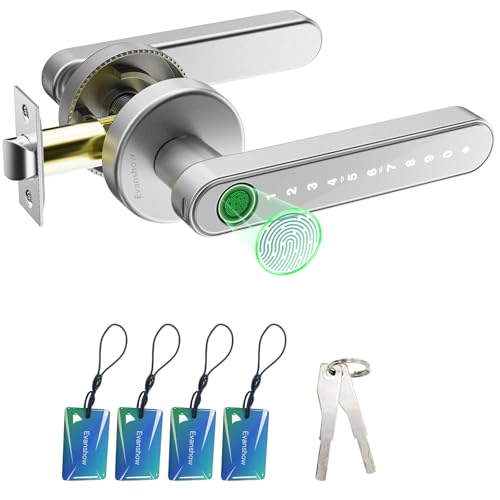
This Silver Evanshow model mirrors the Black variant with the same 4-in-1 access system, 0.5-second fingerprint recognition, and a USB emergency power port. The silver finish offers a different aesthetic suitable for doors where hardware visibility matters. The first-step administrator fingerprint requirement remains essential to prevent unauthorized unlocks. Best for those who prefer a lighter hardware color and consistent performance across color variants.
Who it’s best for: users seeking consistent performance with a lighter metallic finish that matches modern interior hardware.
Why selected: Color option without compromising on bio-metric speed and multi-access features.
Caution: Like the Black variant, ensure administrator fingerprint setup before use to avoid lockouts.
KLLOQUE 4-in-1 Fingerprint Door Lock

KLLOQUE’s fingerprint door lock combines four unlocking methods: fingerprint, keypad password, app Bluetooth control, and backup keys. It includes an anti-peep keypad and can manage multiple users with 20 fingerprint slots and 20 codes. The lock is designed to fit standard US doors with backset compatibility for easy installation on bedrooms or study doors. The product emphasizes app-based management for remote control, access logging, and code sharing. Best for tech-forward users who want centralized control without sacrificing physical keys.
Who it’s best for: households that want app-based access management and anti-peep security.
Why selected: Flexible user management and a robust security feature set in a single lock.
Caution: App-based features may require gateway setup for remote access; verify compatibility with existing door backset.
Yamiry Keypad Smart Door Knob

The Yamiry keypad door knob provides an easy DIY installation, with up to 20 codes for family members along with a one-time code option for guests. It includes a backlit keypad, a low battery indicator, and weather resistance (IP54). The lock is simple to program and install in under 15 minutes, making it a practical choice for quick bedroom or front-door replacements. A key backup remains available for emergency access, and the product supports both mechanical keys and digital entry.
Who it’s best for: renters or homeowners seeking a straightforward, quick-install keypad solution.
Why selected: fast setup and a balanced feature set that covers day-to-day guest access and security.
Caution: Battery life depends on usage; consider wired or battery backup plans for long-term reliability.
ThorBolt G1 Fingerprint Door Knob

The ThorBolt G1 combines a fast fingerprint sensor with a keypad and an auto-lock feature. It supports up to 50 fingerprint IDs and allows up to 100 admin/user passcodes, offering flexible access management. A three-mode toggle—Passage, Admin-Only, and Standard—gives control over access modes, which is useful for spaces like bedrooms that need different security levels at different times. The lock includes two mechanical backup keys in case of battery depletion, ensuring access during emergencies.
Who it’s best for: users who want a high-speed fingerprint experience with flexible mode controls.
Why selected: strong balance between biometrics and keypad options, plus explicit modes for varied security needs.
Caution: Mode toggling requires clear understanding of default settings; misconfiguration can hamper access during sensitive times.
Buying Guide: Key Purchase Considerations
- Fingerprint sensors offer speed but require proper admin setup. Keypads and app controls add convenience but rely on passwords and codes that can be shared or forgotten. Consider a lock that blends biometric, code-based, and mechanical keys for redundancy.
- Most locks run on batteries with a USB emergency power option. Check battery life expectations and whether the lock allows safe external power without compromising internal security.
- Verify backset compatibility (e.g., 2-3/8″ or 2-3/4″), door thickness, and handedness. US-standard doors are common, but confirm fitment before purchase.
- Look for locks that support multiple fingerprints and codes, temporary access, and activity logs. App-enabled systems can simplify sharing and revoking access for guests or cleaners.
- DIY-friendly designs save time, but some models may require professional installation or specific door configurations. Read installation guides for recommended tools and steps.
FAQ for Buyers
- Do I need to register an administrator fingerprint first? Yes, several models require an administrator fingerprint to activate the lock and prevent unauthorized access during initial setup.
- What happens if the battery dies? Most locks include emergency power via USB or provide backup keys. Be sure you have a plan for battery replacement or charging.
- Can I share access with guests? Many models support one-time or temporary codes and app-based access sharing for guests, delivery personnel, or housekeepers.
- Is the keypad susceptible to peeking or smudges? Some locks feature anti-peep keypads to reduce code-guess risk. Always use codes thoughtfully and change them when needed.
- Are these locks suitable for back doors or interior doors? Yes, most models are designed for bedrooms, offices, and interior access, with some suitable for exterior use as well. Check product specifications for the intended door type.
- Do these locks work with smart home systems? Several models offer app control or Bluetooth connectivity, which can integrate with broader smart home setups depending on gateway requirements.
In summary, the five highlighted bedroom locks with codes provide versatile access options, quick entry, and eventful security features suitable for American homes and apartments. When choosing, align the lock’s access methods with your daily routines, number of household members, and willingness to manage codes or app permissions. Always verify door compatibility and review setup requirements to ensure a smooth installation and long-term reliability.